


Most people have no trouble getting their computer to type Japanese, but adding furigana (small hiragana over kanji) for documents and PDFs can be a little harder.
This page will discuss how to add furigana in Microsoft Word 2007 up. Earlier versions of Word also have this feature and the setup may be similar as below. For those without Word, I believe Open Office either has this feature out of the box or as a plugin.
Basically in Word, highlight any Japanese (usually kanji) and click on the Phonetic Guide button:
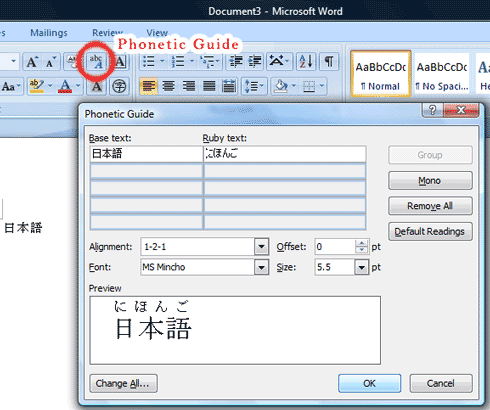
The computer guesses the Ruby text and is usually correct, but you can change it here.
I don’t believe the Phonetic Guide is displayed in the quick launch icon section by default.
Here is how to add the Phonetic Guide to the quick launch section:

1) Right-click on the top bar section and choose ‘Customize Quick Access Toolbar’

2) Under “Choose Commands From” select “All Commands”
3) Find the “Phonetic Guide” and click on “Add”
Now you should see the Phonetic Guide icon at the top for easy access.
You do have to go word by word to make sure the furigana is correct, it is pretty fast and easy.


is this feature only works on few sentences? i tried the whole document but only first paragraph that applied. and it somehow refused when i tried to change font size or bolded it. kinda dissapointed if this feature is half baked or this problem only on my end? can someone can confirm it?
I think there is a limitation to how much it does at once. I usually just add furigana on certain kanji so I haven’t tried doing a full page. You do want to double check to make sure it gets things right, though.